Google Chrome AI Mode Now Supports Side-by-Side Browsing
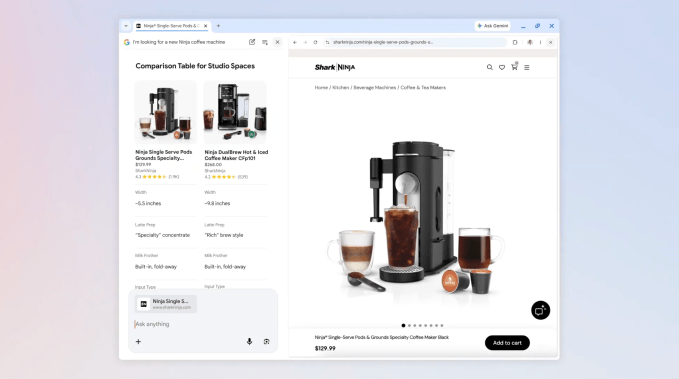
Google is rolling out a significant update to AI Mode on Chrome desktop, transforming how users interact with search results and external websites. The search giant confirmed on Thursday that users can now view web pages side-by-side with their conversational search interface, eliminating the need to jump between multiple browser tabs.
This functionality aims to streamline complex research tasks, allowing users to cross-reference information, compare product details, and pose follow-up questions without losing their initial search context. By keeping the AI assistant active alongside the target webpage, the browser maintains a persistent workspace for the user.
Practical Applications for AI Search
Google suggests that this feature is particularly useful for shopping or deep-dive research. For instance, a user looking for a coffee maker can have their search results open on one side while browsing a retailer’s specific product page on the other. Within this view, the user can ask the AI targeted questions, such as, “How easy is this to clean?”—with the AI drawing context directly from the open webpage and broader web data.
According to the company, early testers reported that the side-by-side view helped them maintain focus on their tasks, as they were no longer forced to toggle constantly between tabs to verify information in long articles or videos.
Cross-Tab Searching Capabilities
Beyond side-by-side viewing, Google is also introducing a method to integrate existing browser tabs into AI-powered searches. This feature, available on both desktop and mobile, allows users to pull content from their current browsing session into the AI’s reasoning process.
To utilize this, users can access the new “plus” menu located in the search box on the “New Tab” page or directly within AI Mode. From there, they can select recent tabs to include in the query, allowing the AI to analyze:
- Multiple open web pages;
- Specific images;
- Relevant files or documents.
For example, a student studying for a statistics exam can aggregate data from class notes, lecture slides, and open educational websites to ask for specific, contextualized examples. Similarly, a user researching travel plans can combine several open tabs on hiking trails to request recommendations for similar locations elsewhere.
These updates to AI Mode are currently being deployed to users in the United States, with Google confirming plans to broaden availability to other regions in the coming months.