Google Chrome Adds Productivity Tools to Fend Off AI Rivals
Google is sharpening the competitive edge of its flagship browser, Chrome, by introducing a suite of productivity-focused features. The update arrives as tech giants and agile startups intensify the so-called “browser wars,” pushing Google to accelerate the development of user-facing tools.
The latest enhancements include Split View, integrated PDF annotation, and a direct “Save to Google Drive” option. These additions aim to deepen the integration between Chrome and Google’s broader ecosystem, providing users with more utility without needing to leave the browser interface.
New Workflow Features
The update introduces several functional improvements designed to streamline daily browsing tasks:
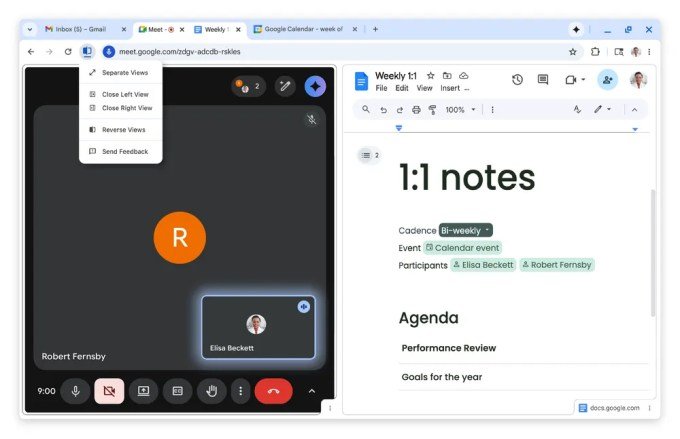
- Split View: Allows users to view two web pages side-by-side within a single tab. This can be activated by dragging a tab to the window edge or using the right-click menu to “Open Link in Split View.”
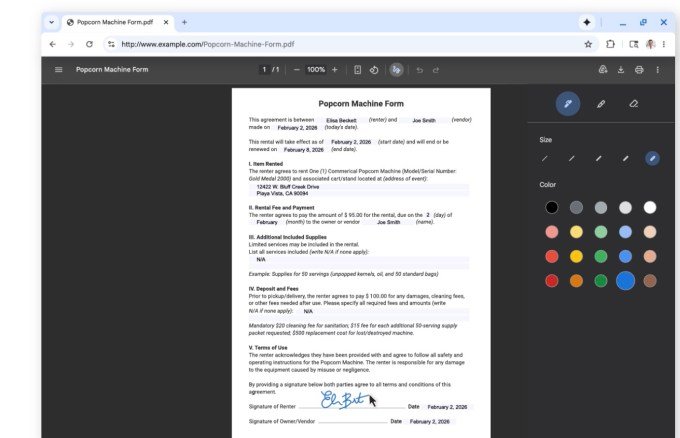
- PDF Annotations: Users can now highlight text or add notes directly within the browser, eliminating the need to export files to external applications.
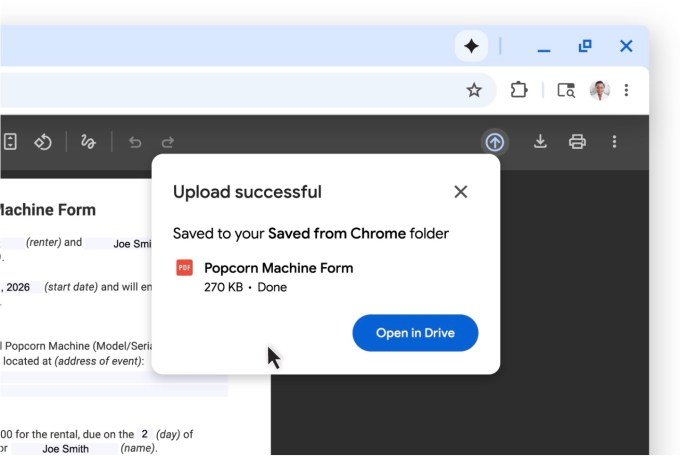
- Save to Google Drive: PDFs can be saved directly to a dedicated “Saved from Chrome” folder in Drive, preventing files from getting lost in local downloads.
Responding to Market Pressure
While these specific productivity tools are not AI-driven, they exist within a broader strategy to retain users against competitors like OpenAI and Perplexity, which have begun exploring agentic browser technologies. Google has already integrated its Gemini AI assistant into Chrome to stay relevant in this evolving space.
Looking ahead, Google is expected to implement support for vertical tabs, a feature popularized by alternative browsers such as Arc and Dia. This move is part of a wider effort to modernize the interface and reduce user churn. Tech-savvy users can already test early versions of vertical tab layouts by modifying experimental browser flags.