Gemini Replaces Google Assistant in Android Auto Globally
Google has officially initiated the global rollout of Gemini for Android Auto, marking a significant transition as the AI assistant begins to replace Google Assistant within vehicles. The update, announced Thursday, brings more conversational capabilities to millions of cars, trucks, and SUVs currently using the smartphone projection platform.
Enhanced Interaction for Drivers
The integration aims to shift the driving experience from simple command-based inputs to more fluid, back-and-forth interactions. By upgrading from Google Assistant to Gemini on their smartphones, users will unlock the new interface directly on their car’s dashboard. This rollout aligns with the company’s broader strategy, first announced in May, to replace the legacy Assistant with Gemini across its entire hardware and software ecosystem.
With the new AI capabilities, users can perform more complex tasks through natural language, such as:
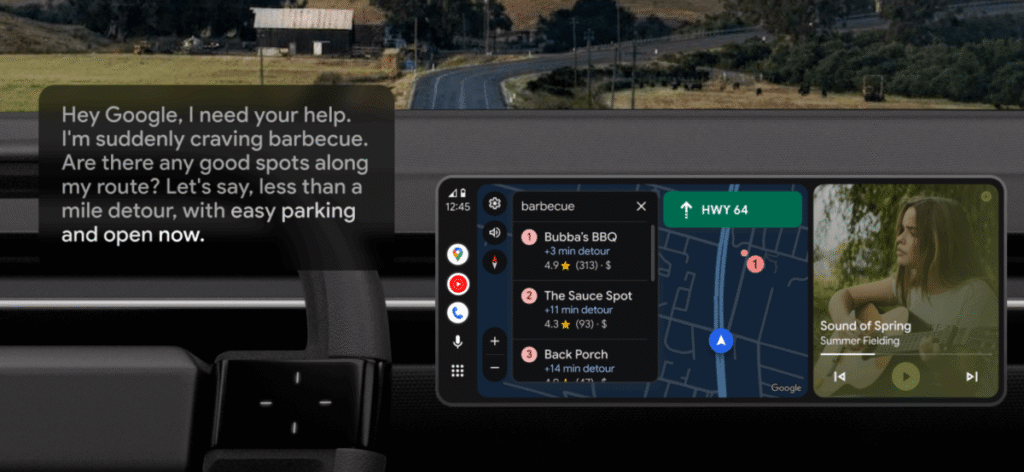
- Route Planning: Asking for specific types of businesses, like barbecue joints, that are open and located along the current path.
- Contextual Info: Requesting details about a destination, such as whether a restaurant is dog-friendly or what its signature dishes are.
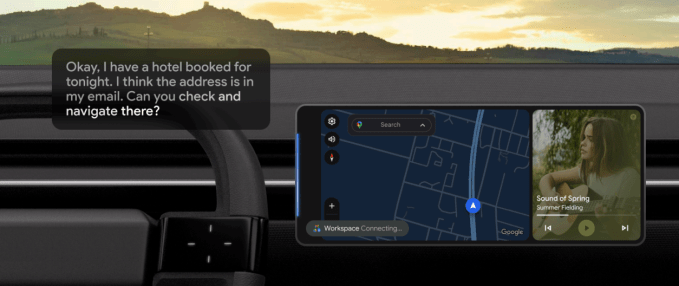
- Email Management: Retrieving addresses from Gmail to initiate navigation or requesting summaries of unread messages.
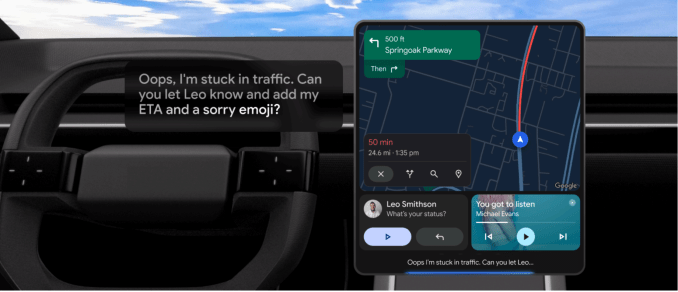
- Communication: Drafting replies to text messages, including the ability to share real-time ETA updates or translate content into other languages.
- Media Control: Creating custom soundtracks for trips by requesting playlists based on specific criteria, such as length and genre, via services like Spotify or YouTube Music.
Live Chat and Global Availability
Beyond task execution, users can trigger a “Live” chat mode by saying, “Hey, Google, let’s chat.” This feature allows for brainstorming or learning new information during a drive, such as asking for fun facts about a destination or advice on gift ideas for an upcoming event.
The feature is launching in 45 languages. To access it, drivers must ensure the Gemini app is active on their phone. Once available, a tooltip will appear on the vehicle display. Interaction is handled by saying “Hey, Google,” followed by pressing the microphone button on the screen or long-pressing the voice control button on the steering wheel.