
Spotify Now Lets Users Disable All In-App Videos
, including Canvas and video podcasts, across all devices.
TAGS: Spotify, Tech News, Streaming, Music Apps, Digital Privacy
CONTEUDO:
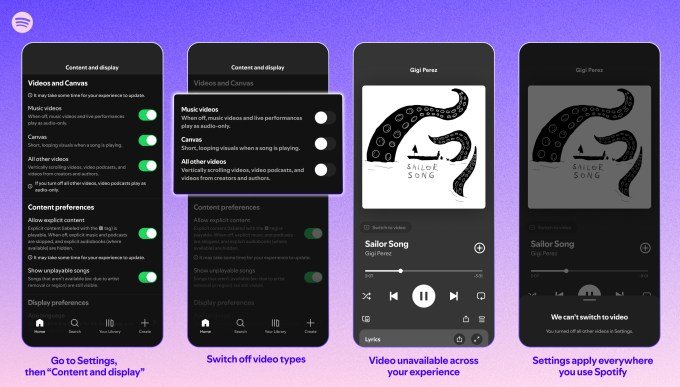
Spotify is rolling out a global update that grants users full control over video content within its platform. Starting now, listeners can opt for an audio-first experience by disabling video features, including looping Canvas visuals and video segments for music and podcasts, directly through the app settings.
Expanded Parental and User Controls
The feature set, previously limited to managed accounts for users under 13, is now available to all subscribers. Spotify reported that when the tool was restricted to younger demographics, 60% of guardians opted to disable video content for those accounts.
Now, this capability extends across the entire user base, including:
- Family Plan managers, who can toggle video settings for any member of their subscription.
- Premium and Basic subscribers across Individual, Duo, and Student plans.
- Users on the ad-supported free tier.
How to Update Your Preferences
To deactivate video elements, navigate to the app settings and select the “Content and display” menu. Changes made here will sync across all platforms, including desktop, mobile, web, and TV. The company clarified that while users can disable standard video content, video advertisements and certain Canvas-style visuals attached to audio ads will remain visible.
The shift comes as Spotify continues to balance its official announcement of a more personalized listening experience with its broader strategy to integrate video. Since the introduction of Canvas in 2018, followed by video podcasts in 2020 and music videos in 2024, the platform has steadily increased its visual footprint to compete with rivals like YouTube.
“Listeners can now choose exactly how they want to engage with the videos that amplify music, podcasts, and audiobooks on Spotify,” the company stated, emphasizing that “control changes everything.”