
Zoom Brings AI Companion to Web with Free User Access
Zoom is expanding the reach of its AI Companion 3.0, launching a dedicated web interface that brings generative artificial intelligence tools to a broader audience. For the first time, users on the platform’s free tier gain access to automated meeting insights, including summaries, action item tracking, and intelligent note-taking capabilities.
This rollout marks a shift in how the company positions its productivity suite against competitors like Google, Microsoft, Notion, and ClickUp. By integrating AI directly into the browser experience, Zoom aims to capture more context from user data across various services.
Access Tiers and Capabilities
While the AI features are now available to those on the basic plan, usage is subject to specific constraints:
- Meeting Limits: Free users can utilize AI Companion features for up to three meetings per month.
- Query Allowance: Users are granted 20 questions per month via the side panel and the new web interface.
- Optional Upgrades: A $10 add-on plan is available for those requiring expanded access to the full suite of AI capabilities.
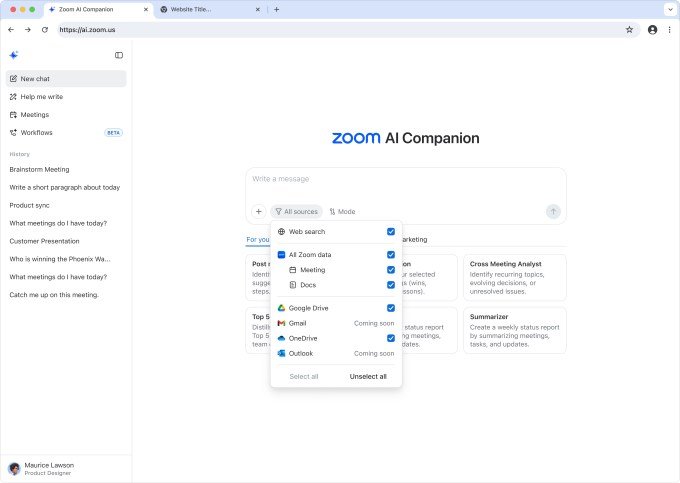
The new web surface also introduces “conversation starter” prompts, designed to guide users through the assistant’s functional range, which includes generating daily reflection reports, drafting emails, and creating follow-up tasks based on meeting transcripts.
Deepening Data Integration
A significant component of the AI Companion 3.0 update is its ability to synthesize information from external ecosystems. The assistant can currently retrieve data from Google Drive and Microsoft OneDrive, with plans to add connectors for Gmail and Microsoft Outlook in the near future.
Lijuan Qin, head of AI product at Zoom, emphasized that the company’s status as an independent operator provides a unique advantage. By leveraging proprietary models alongside technology from OpenAI and Anthropic, Zoom claims to offer superior contextual meeting data compared to integrated productivity suites.
Enhanced Documentation Tools
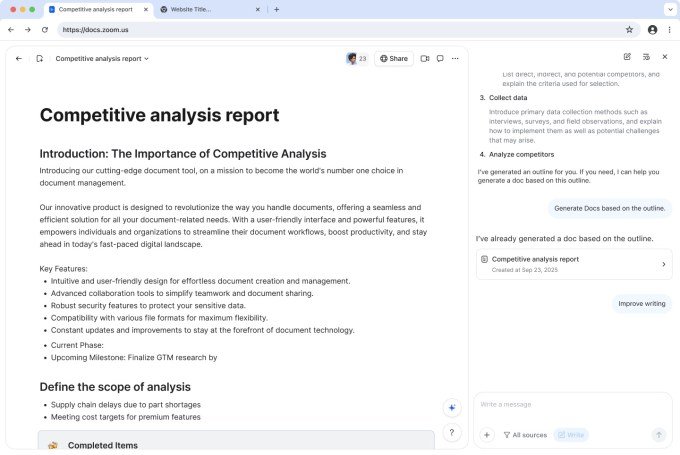
Beyond meeting management, Zoom is bolstering its document creation features. Users can now draft and edit content directly within the companion interface, utilizing details extracted from meetings. Once drafted, projects can be transferred to Zoom Docs for team collaboration. The platform supports exporting these documents in various formats, including Markdown (MD), PDF, and Microsoft Word.
This push into document management and cross-app intelligence follows the company’s earlier release of a cross-platform notetaker, which functions across various meeting applications and offline environments.